


This is the menu's home page, and the best place to start when you're not sure what to do.
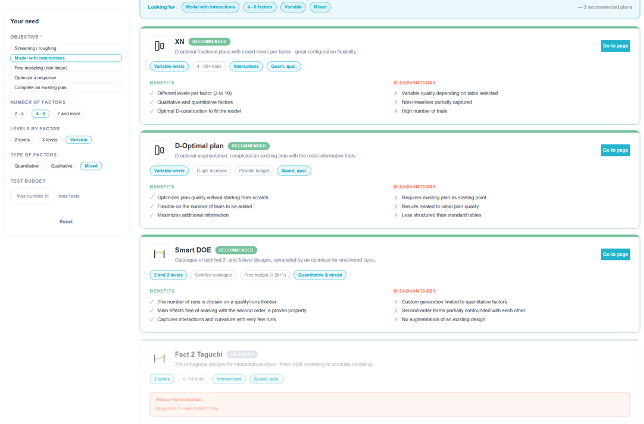
1. Describe your needs
The panel on the left, «Your Needs,» includes five criteria. Only the first one is required.
| Criteria | Values |
| Objective | Screen / Rough-cut · Model with interactions · Refine the model (nonlinear) · Optimize a response · Expand an existing plan |
| Number of factors | 2–3 · 4–6 · 7 and more |
| Levels by Factor | 2 levels · 3 levels · Variable |
| Type of factors | Quantitative · Qualitative · Mixed-Methods |
| Test Budget | a maximum number of attempts |
Some combinations are incompatible, and the corresponding button is grayed out: «Fine-tune (nonlinear)» prevents the selection of «2 levels,» since curvature cannot be estimated based on just two points.
A banner summarizes the search query—«You're looking for: …»—and displays the number of recommended results. The «Reset» button clears the filters.
Read the fact sheets
Each plan is assigned a colored card based on its status:
| Status | Color | Meaning |
| Recommended | green | Compatible with all specified criteria. |
| Compatible | orange | Usable, but only partially suitable based on at least one criterion. |
| Sidelined | gray | Incompatible. The record displays the ground for exclusion. |
The fact sheet provides a description of the plan and its benefits and its disadvantages In two columns, there are attribute labels (levels, test ranges, accepted factor types); those that meet a criterion you have specified are highlighted in blue, and there is a «Go to Page» button.
💡 Rejected entries remain displayed—by design. The reason for exclusion is often more informative than the recommendation: «Requires only two-level factors,» «Limited to a maximum of 6 factors,» «Does not allow for expanding an existing design.» You can learn the scope of application for each family by reading why it is not suitable.
⚠️ This page discusses what you declare, not on the content of your project. It does not analyze the factor table: it is a decision-making guide, not a diagnostic tool.