


Data Analysis is a module of the Ellistat suite, just like’APC, SPC or METRO… There are two ways to get there.
From the home page. It displays one tile per module, and Only the modules covered by your license are displayed. The Data Analysis tile is labeled « Analyze your data in just two clicks ». One click opens the list of your projects.
From the module selector. Located at the top of the sidebar, it allows you to switch between modules without having to go back to the home page. The current module is highlighted there.
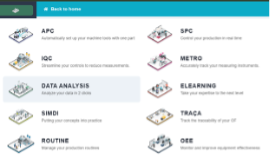
💡 If an expected module doesn't appear anywhere, it's not a display issue—it's the license. The home page and the selector use the same permissions.