


The page List of My Projects consists of two sections.
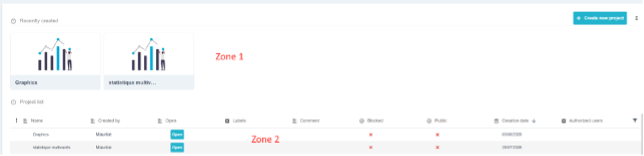
Zone 1: Recently Created displays the two most recently edited projects as cards: one click opens them. It's a handy shortcut for everyday use.
Zone 2: List of Projects Here is the complete table, with one row per project:
| Column | Contents |
| name | The project name, which can be edited directly. |
| created by | The user who created it. Cannot be edited. |
| Open | Open the project in its grid view. |
| labels | Color-coded filing labels that can be created on the fly. |
| comment | Free-form text. |
| blocked, public | See § 4. |
| date of creation, last update | Filled in automatically. |
| authorized users | See § 4. |
Create a project : The «Create a New Project» button opens a form: name (required), comment, tags, authorized users, and the "Locked" and "Public" indicators. Upon submission, Ellistat opens the new project grid directly : There are no intermediate steps.
The ⋮ menu next to the button offers « Import an .eli2 file » (see § 6).
💡 The use of labels are often underestimated. With a database of more than fifty projects, they are the only way to quickly find «all supplier qualification projects» or «all design of experiments for Line 3.» They can be filtered in the table and created from the form, without having to go through an administration screen.