


The principle
In production, you measure a characteristic Y and one or two characteristics X. The scatter plot shows that they are related, even though you don’t know the equation. The Specigraph fits a regression model to this scatter plot, then reasons in reverse: since Y must remain between its minimum and maximum values, how far can X vary?
The reasoning follows a three-step process, and it is the second step that makes all the difference:
- The model describes the average relationship between X and Y => its slope is the sensitivity ∂Y/∂X;
- The model never explains everything: there remains a residual variance S. This variance is drawn from the tolerance of Y in the form of a guard band, before any allocation takes place. This is the price of your ignorance, and it must be paid first;
- What remains of Y's tolerance is divided by the sensitivity: this is X's tolerance.
💡 The result is counterintuitive and worth keeping in mind: improving the model frees up tolerance. Adding a second explanatory factor, which reduces residual variance, directly increases the tolerance you can allow for your X values, without changing anything about the process.
Select the variables
The data comes from the grid, which you can open by clicking the grid icon in the upper-right corner of the title bar. The Variable Selection panel is used for hypothesis testing: one row per column in the dataset, a type label, and two columns of X and Y boxes.
Check one or two columns in the X axis, and only one in the Y axis. Only numeric columns can be selected. The number of selected Xs determines the rest of the screen without any further settings: one factor produces the classic parallelogram, two factors produce an acceptance map in the plane. If more than two factors are selected, the selection is rejected.
Declare Your Intent
The "Intention" column is the heart of the screen: you don't set up a calculation there; instead, you state what you're looking for and what you're willing to risk.
The Meaning of Transference
- Y → X (deduce): The specification for Y is dictated by the customer, the design, or the function, and the specification for X is deduced from it. This is the natural approach to design.
- X → Y (check): The tolerances for X reflect what the process is capable of, and we look at what Y turns out to be. This is the purpose of negotiating with a supplier or justifying an existing solution.
When switching from Y → X to X → Y, the targets and tolerances for the X values are automatically populated with the result that has just been derived: this allows us to immediately verify the consistency between the two readings.
The model
Order 1 or 2, and, with two factors, an Interaction X₁·X₂ term. Order 1 is sufficient in most cases; order 2 is used when the cloud is visibly curved. The regression is calculated using the least squares method on centered variables.
⚠️ Degree 2 is not free. It consumes one degree of freedom, makes the X tolerance asymmetric (the result is then displayed as +a / −b rather than ±), and can produce multiple disjoint acceptance zones. Use it only if the curvature is real: the screen indicates this in both cases, suggesting degree 2 when the residuals are curved, and flagging overfitting when the quadratic term is not significant.
The aggregation method
Four methods, from the most conservative to the most economical. They do not change the model; they only change the way the guard band is selected and the dispersions are calculated.
| Method | What You Report | What it implies |
| Worst-case scenario (Z·S) | A Z coefficient (default value: 2) | The guard band is equal to Z times the residual dispersion. This is a simple arithmetic method, but it is highly sensitive to the chosen value of Z: between Z = 2 and Z = 3, the tolerance of X can be reduced by a factor of ten. |
| Tolerance band (p, 1−α) | A proportion of compliant parts (90 / 95 / 99 / 99.73 %) and a confidence level (90 / 95 / 99 %) | You no longer choose a coefficient; you state an intention. The coverage factor is calculated, taking into account the number of degrees of freedom and the uncertainty in the curve’s position. This is the preferred method when the result must be defensible. |
| Statistics | A target Cpk for Y (1 by default) | The variances are no longer added; they are squared. This is significantly less severe than the worst-case scenario, provided that the X's are independent. |
| Inertial | Nothing but the specification | The result is expressed as the maximum allowable inertia along the X-axis: you are free to choose between dispersion and offset, as long as √(σ² + δ²) remains below the inertia value. Available only in a bilateral configuration. |
The measurement uncertainty on Y
It is added quadratically to the model’s residual variance. Leave it as 0 if the uncertainty is negligible compared to the residual; include it as soon as it is of the same order of magnitude, otherwise you risk imposing a requirement on X that actually applies only to the measurement method.
The Y Specification
You enter a Min and a Max, not a target value with a tolerance. This is by design: the two fields are independent, and either one can be left blank.
- Both terminals are filled in: bilateral specification. The Target field displays the calculated center (auto); it becomes editable if you want to intentionally offset the target.
- Only one boundary is specified: unilateral specification. The missing boundary is considered to be infinity; the result is expressed as X ≥ … or X ≤ …, and no tolerance interval is defined. The target then becomes mandatory: without it, we don’t know what to aim for.
- Both fields are empty: the calculation is blocked, and an explicit message is displayed.
The distribution between the two Xs
This list appears only in two factors and in the Y → X direction. It addresses a real difficulty: the problem is underdetermined. One equation, two unknowns—there are an infinite number of tolerance pairs that satisfy Y. No single calculation can resolve this on its own; it is a decision, and the screen prompts you to make it explicitly.
- Proportional to capability (default): the tolerances are proportional to the actual variances observed for the two Xs. Both processes are therefore required to have the same Cp—this is the most equitable distribution in industrial practice.
- Equal contribution: Each X contributes half of Y’s budget. Fair on paper, but often unfair in the workshop: the most capable worker is expected to make an effort that he or she wouldn’t otherwise have had to make.
- X₁ Target / X₂ Target: You set the tolerance for one—the one the supplier or machine can meet—and the other absorbs the remainder. A message appears if the budget has already been exhausted.
The targets and tolerances for the X-coordinates are entered in the X → Y direction, and in two factors when a «fixed» rule is selected.
Read the chart
In a single figure, the graph conveys the entire line of reasoning: the cloud of measurements, the model curve, the solid-color control band bordered by a dotted line, the Min and Max specification lines for Y, the limits derived for X shown as labeled vertical lines, and the acceptance zone in solid green—the set of X values that guarantee Y.
Hovering over a point displays its values, the predicted value, and the residual. Hovering over the background displays the X value, the predicted Y value, the local sensitivity, and the probability of compliance at that location.
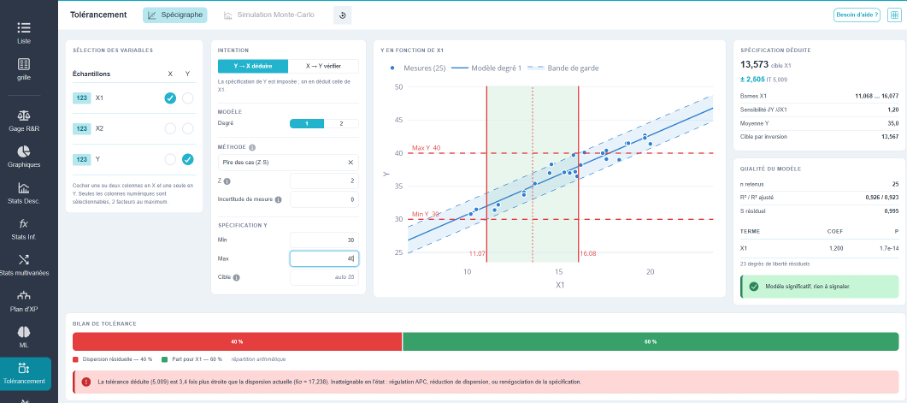
In the screenshot above, the specification for Y is 30/40, and the first-degree model has a slope of 1.20: the tolerance of 10 on Y, once the safety margin is removed, allows for a range of 5.009 on X₁, between 11.068 and 16.077.
In the case of two factors, the acceptance zone is no longer an interval but a region of the (X₁, X₂) plane. The segmented button offers two views:
- 2D map, working view, and default view. It shows the acceptance region as a solid area, the Y = target isocline, the current process dispersion ellipse at 95 %, the measurement cloud, and the derived tolerance rectangle. This is the view used to make decisions: the rectangle is the one that lies on a plane, the region represents the true value, and the ellipse indicates where the process actually operates.
- 3D, conceptual view. The response surface is plotted as a mesh, colored according to compliance, with the specification planes and two sliders for rotation and elevation. It is used to explain the shape of the relationship, not to make a decision.
💡 The rectangle is always smaller than the acceptance region: a drawing specifies rectangular tolerances, whereas the area that actually meets the specifications is oblique as soon as the two factors offset each other. The difference between the two is exactly the tolerance you lose due to the rectangular shape—and that is what you regain by controlling both factors together.
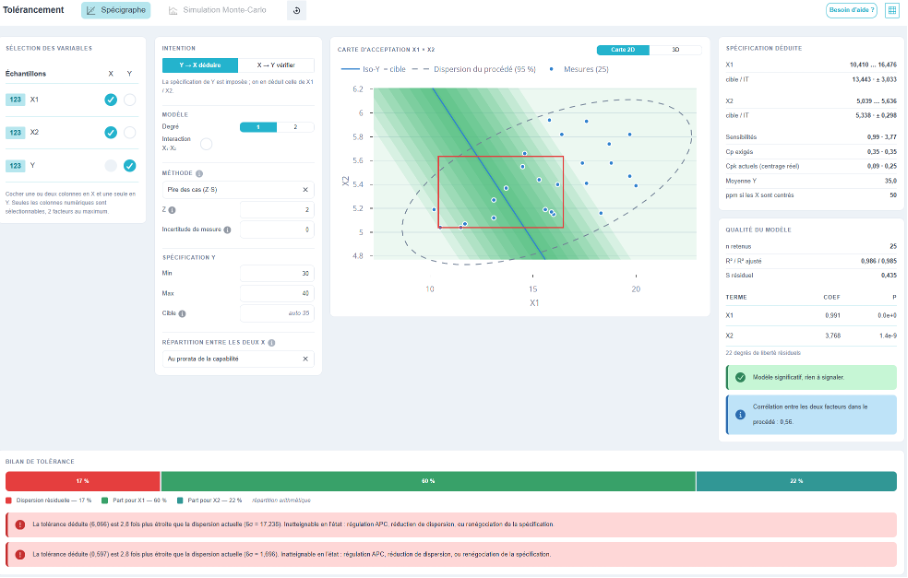
In this screenshot, the pro-rata distribution of capability assigns ±3.033 to X₁ and ±0.298 to X₂: the two tolerances are very different, but they require the same Cp (0.35) for each of the two processes.
The Derived Specification
The right-hand column provides the result in a format that can be directly transferred to a diagram: the target for each X, the tolerance interval, and the two limits. In addition, it includes the quantities needed to evaluate this result:
- the sensitivity ∂Y/∂X, which indicates how much Y changes when X changes by one unit. This is the transfer ratio: a high sensitivity results in a narrow tolerance for X;
- the expected mean of Y at the proposed setting;
- the inverse target, displayed next to the selected target when the two differ. At degree 1, they coincide; as soon as the curve is not straight, the selected target is the point of maximum margin—that is, the most robust setting—and not the mathematical inverse of the Y target;
- into two factors: the required Cp values (the target values) compared to the current Cpk values (the actual performance of the process, including off-center conditions), and the projected ppm if the Xs are centered.
⚠️ At Level 2, the tolerance is asymmetric and is displayed as +a / −b. Do not plot it as ± on the diagram: the margin is not the same on both sides of the target.
The quality of the model
A tolerance transfer is only as good as the model itself. The “Quality” section of the model provides, in the order of useful interpretation: the number of retained points, R² and adjusted R², the residual variance S, followed by a table of the model terms with their coefficients and p-values, and the number of residual degrees of freedom. A colored banner summarizes the results, using the same color code as the hypothesis tests.
💡 R² isn't the right metric here; it's S that matters. R² indicates what proportion of the variation is explained; S indicates, in units of Y, what the model cannot predict—and it is this S, and S alone, that is deducted from your tolerance.
The Tolerance Assessment
This is the full-width banner at the bottom of the screen, and it likely contains the most useful information on the screen. It breaks down the Y tolerance into segments: the model’s residual dispersion, the measurement uncertainty, and then the remaining portions for X₁ and X₂.
The note below the bar specifies the nature of the distribution: arithmetic distribution in the worst-case scenario and within a tolerance band; variance distribution in statistical and inertial terms. The two are not interpreted in the same way and are not added together in the same way.
💡 Read the analysis before looking at the result. When residual variation takes up 40 % of the bar, it means that 40 % of the customer’s tolerance has already been used up by factors you can’t explain—even before you’ve manufactured a single part. The only lever you have at that point is the model: one more explanatory factor, or a measurement with less noise.
Safeguards
A tolerance shift always produces a number. The question is whether that number means anything. Ellistat checks for you the situations in which it means nothing, and displays them clearly below the graph or in the summary banner.
| Situation Detected | What Ellistat Says |
| Insignificant slope | The connection is too weak to support a tolerance: the range on X is unbounded. The result is blocked; no numbers are displayed—this is intentional. |
| A significant but uncertain slope | Uncertainty regarding the slope widens the true tolerance; the order of magnitude of this widening is indicated. |
| Unmodeled curvature | The residues from degree 1 form a curve: it is recommended to proceed to degree 2. |
| Insignificant curvature | At degree 2, the quadratic term is not significant: the model is overfitted; return to degree 1. |
| Non-homogeneous dispersion | The dispersion widens from one end of the cloud to the other: the band is no longer a parallelogram, and the calculated tolerance is asymmetrical. |
| Correlated Factors | The two Xs vary together in the process: their coefficients are not well separated, and the distribution between the two is fragile. |
| Extrapolation | The inferred target falls outside the range actually observed: the model has never been verified against it. |
| Industrial Feasibility | The calculated tolerance is compared to the actual dispersion observed on X. If it is narrower, the message states this explicitly and encrypts the report. |
| Dominant residue | The model uses up more than half of Y's tolerance: look for an additional explanatory factor before setting the tolerance. |
| No drop-off area | No value of X can guarantee the specification of Y: the transfer is impossible under these conditions, and the screen indicates which parameter should be released. |
💡 These messages are not options: they appear automatically. That is what distinguishes a tolerance transfer from a simple division by the slope.
The direction X → Y: check
The other way to interpret this addresses a negotiation question: «My process can maintain a certain tolerance on X; what does that mean for Y?» You enter the targets and tolerances for X, and Ellistat calculates the behavior of Y: expected mean and standard deviation, the resulting tolerance interval compared to the one you have, projected Cp and Cpk values, and the nonconformance rate in ppm.
The calculation of ppm involves a simulation, not simply cascading tolerances: as soon as the model is not a straight line, the linear propagation of deviations is incorrect.
💡 Switching back and forth between the two directions is the most productive action on the screen. First, we determine the required tolerance (Y → X); we see that it is unattainable, we switch to X → Y using the process’s capabilities, and we obtain the ppm to report to the client—or the quantified argument for renegotiating the specification. Upon switching, the derived values are automatically carried over.