


What is it used for?
Here, the relationship between the characteristics is known: it is a formula. The calculation of spring stiffness, assembly clearance, or a gear ratio. Each factor X has a design tolerance, a distribution law, and a capability requirement. The question is: what distribution of Y does this produce, what is the nonconformance rate, and which factor is responsible for what?
The answer is obtained through a trial-and-error process: hundreds of thousands of virtual parts are created and then measured. The screen operates only in the X → Y direction.
The two-level model: lot, then part
This is what sets this simulation apart from all the others, and it’s important to understand this before interpreting the results.
Tolerance software calculates parts within a single, target-centered tolerance band with the maximum allowable dispersion. This is based on the assumption of a perfect supplier: its average never deviates. The reality in industry is different—the average for one batch is not the same as that of the next: changes in tools, materials, machines, or seasons.
Ellistat It therefore simulates on two levels. For each lot, we first calculate a mean and a standard deviation for each factor, and then we generate the parts in that lot around that mean. This is the Type D model from ISO 22514-2 (variable position and variable dispersion), and it is what allows us to answer the question that really matters: not «Is a part conforming?» but «Will a randomly selected lot be capable?» .”.
⚠️ The batch adjustment range is not unrestricted: an off-center batch is mechanically constrained to be tighter, since it must still meet the minimum Cpk required for the factor. This coupling is not a calculation artifact; it is the behavior of a supplier managing its capability—and it is directly visible on the control chart.
Declare the X factors
The table in the first column is filled in row by row—one factor per row—using the "+ factor" button. The columns are organized into three groups:
⇒ the identity of the factor: its name—the one you will use in the formula—and its distribution (Gaussian, Uniform, Triangular, Log-normal);
- the tolerance of the drawing: Min and Max, that is, what is written on the drawing;
- The requirement per lot: the minimum Cpk that the supplier agrees to maintain for this factor;
- the permitted variation from one batch to another: the range within which the batch mean may vary (μ min, μ max) and the maximum standard deviation σ max.
💡 Distribution functions are not defined by their natural parameters but by (mean, standard deviation). This is what makes it possible to control any distribution function using a Cpk requirement and to compare distribution functions with each other when they have equal capability.
The Y-output and its formula
Below the factors table, the Y-Output block contains the formula, the name of the calculated quantity, its tolerance (Min and Max), and, if necessary, a noise standard deviation—anything not accounted for by the formula: unmodeled phenomena, measurement uncertainty on Y.
The formula is written in plain text, using the names of the factors. Common operators are accepted, including ^ for exponentiation, as well as the functions sqrt, abs, exp, log, log10, sin, cos, tan, atan, min, max, pow, and the constant PI. A typing error is flagged at the exact location where it occurs, along with the name of the unknown term in question.
⚠️ If any simulations produce an undefined value (division by zero, square root of a negative number), their count is displayed. This is not a minor issue: it means that your formula is not valid across the entire tolerance range of your factors.
The Simulation Plan
The "Intention" column controls how the simulation is performed: the number of lots, the number of parts per lot, the sampling method, the mode of inter-lot variability, and the target Cpk per lot—the value below which a lot will be declared non-capable.
The three types of inter-batch variability address three different questions:
| Mode | How does the batch average perform? | What He Tells You |
| Ideals | Each shot is perfectly centered on the target. | The optimistic scenario. This is the assumption underlying traditional tolerance calculation software: useful for comparison, but not for decision-making. |
| Realists | The batch average fluctuates around the midpoint of the acceptable range, with large deviations being less common than small ones. | The typical industrial scenario, selected by default. |
| At worst | The batch average can fall anywhere within the acceptable range, with no preference. | The worst-case scenario: what happens if the supplier takes full advantage of the leeway you've granted them. |
⚠️ The selected mode completely changes the results: switching from «ideal» to «worst-case» can increase the nonconformance rate by several orders of magnitude, even though no tolerances have been changed. It is the adjustment drift—not machine variation—that dominates most real-world cases.
The sampling method offers the Latin hypercube—selected by default—or simple Monte Carlo. The Latin hypercube distributes the samples more evenly across the domain and, given the same number of samples, yields a significantly more stable result—especially since the formula is close to a sum, which is the case for all odds chains.
The calculation is started by clicking the "Simulate" button. Any change to a parameter invalidates the displayed result, and the button becomes highlighted again: what you see always corresponds to the most recent calculation, never to the current input. The calculation time and the number of simulated parts are displayed in the title bar.
The Five Charts
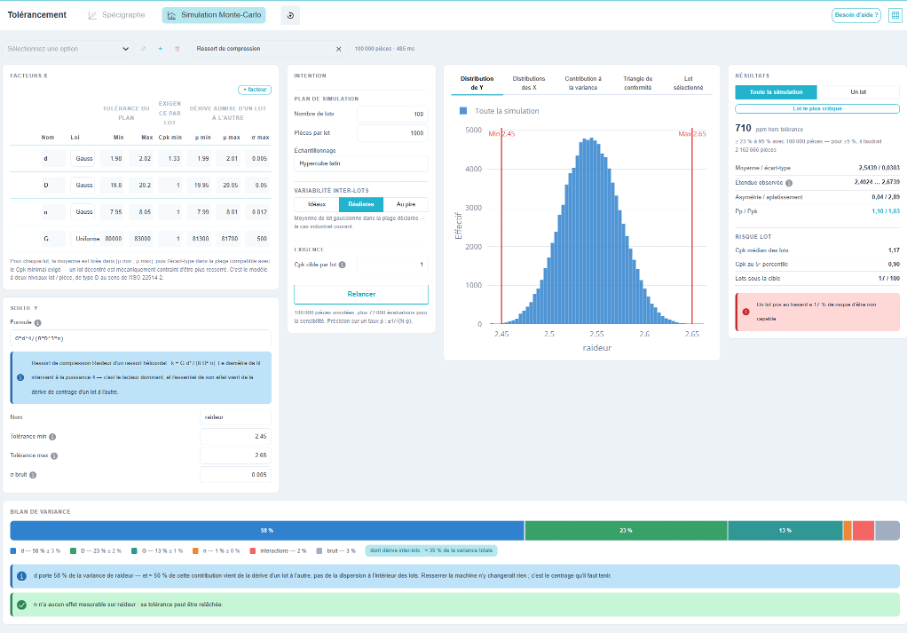
Distribution of Y. The histogram of the output characteristic, showing its specification limits. In «single lot» mode, the histogram of the selected lot is superimposed on that of the entire population (shown in faded gray): this makes it immediately clear where that lot falls within the overall distribution.
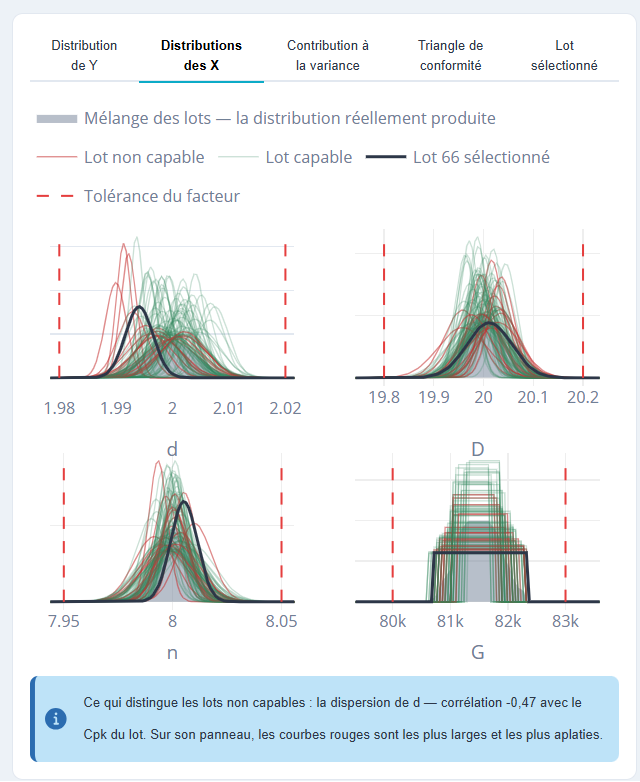
Distributions of the X values. One panel per factor, and within each panel, one curve per batch, plotted based on the setting used for that batch. The curves are colored according to the batch’s capability on Y: this makes it immediately clear what the failed batches have in common with respect to this factor (a shifted position or wider dispersion). A solid gray background represents the combination of all lots—that is, the actual production distribution, which is often much wider than any single lot. The selected lot is plotted on top with a thick line, and the factor’s tolerances are shown as a dashed line.
Below the graph, a diagnostic statement identifies what distinguishes non-capable lots: the skewness of a factor, or its dispersion, along with the corresponding correlation.
Contribution to variance. Sorted horizontal bars, one per factor, that answer the question, «If I had to tighten just one tolerance, which one would it be?» Each bar is divided into two shades: the portion due to variation within lots and the portion due to variation between lots. A whisker indicates the confidence interval for the index, and two additional bars isolate interactions and noise.
💡 This is the most useful distinction on the screen. If a factor’s contribution stems mainly from inter-batch variation, tightening up the machine won’t make a difference: it’s the centering that needs to be maintained. If it stems from intra-batch variation, it’s the production process that needs to be improved. These two levers have neither the same cost nor the same person responsible.
⚠️ When the sum of the contributions does not equal 100 %, the difference is accounted for by the interactions: the formula is not a simple sum, and a standard quadratic sum would underestimate the variance of Y.
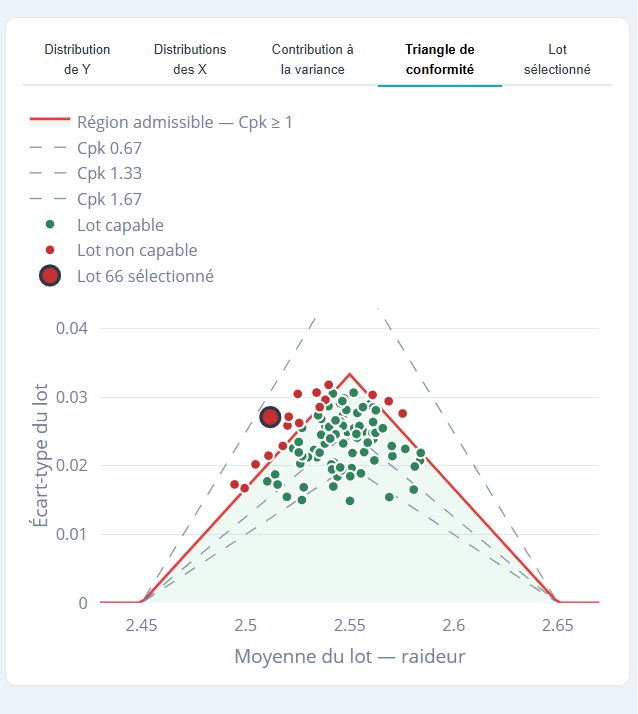
Conformity Triangle. One point per lot, positioned based on that lot’s mean and standard deviation; green if the lot is capable, red otherwise. The contour lines are the iso-Cpk lines: the line corresponding to the target Cpk defines the acceptable region. The triangular shape is not a graphical choice; it is the model itself: the more a batch is offset from the mean, the less variation it is allowed. Each point is clickable and switches the results column to that batch.
Selected batch. The histogram of the single selected batch, with out-of-tolerance parts shown in red, the fitted normal distribution, and the batch mean shown as a dotted line. This is the “what-if” view: this is what the customer would have received if this batch had been shipped.
The results: the entire simulation, or a batch
The right-hand column has a two-position button, and that is a key distinction.
The entire simulation provides the characteristics of the resulting population: mean, standard deviation, observed range, skewness and kurtosis, nonconformance rate in ppm, Pp, and Ppk. The «Batch Risk» block supplements this by revealing what the mean hides: the median Cpk of the batches, the Cpk at the fifth percentile, the number of batches below the target, and the resulting statement—“a randomly selected batch has such-and-such a risk of being non-capable.”.
A batch provides details about a specific batch: its Cpk, mean, standard deviation, nonconformance rate, and, most importantly, the settings that were determined for it, factor by factor. This answers the question we ask ourselves when faced with an outlier batch: Why this one? A single sentence identifies the factor most responsible.
Three ways to select a lot, all synchronized: click a point on the compliance triangle, select it from the drop-down list (each entry displays its Cpk), or use the "Most Critical Lot" button, which jumps directly to the worst one.
⚠️ The non-conformance rate is an estimate, and its uncertainty is displayed alongside it: «710 ppm ± 23 % at 95 % with 100,000 parts.» A low rate requires a large number of parts to be determined precisely (the number needed to achieve ±5 % is indicated). And if no parts fell outside the tolerance, this does not mean the rate is zero: the upper limit is noted.
💡 When the distribution of Y deviates significantly from the normal distribution—which happens as soon as the formula is highly nonlinear (the Pp and Ppk indices calculated based on the standard deviation become misleading). Ellistat then switches to indices calculated using percentiles, in accordance with ISO 22514-2, and flags this change. This prevents the common inconsistency between a Ppk value indicating a few thousand ppm and a count that finds none.
The variance statement
The bottom bar chart is the equivalent of the Spécigraphe’s tolerance report, adapted to variances: one segment per factor, plus one segment for interactions and one for noise. A dot indicates the proportion of the total variance attributable to inter-batch variation, regardless of the cause.
Below, the messages draw the following conclusions: the dominant factor and the source of its contribution; the factors with no measurable effect, for which tolerance limits can be relaxed—and thus the money that can be recovered without risk; and the significance of interactions when they become significant.
The Example Library
The title bar selector loads a complete case—factors, formula, tolerances, simulation plan—and starts the calculation. This is the fastest way to get started with the program, and it serves as the foundation for building your own models:
- Compression spring: stiffness as a function of wire diameter, coil diameter, number of coils, and shear modulus. A typical case where one factor overshadows the others because it is raised to the fourth power;
- Dimension chain: a set of assembly dimensions obtained by the difference of three dimensions. The strictly additive case, that of classical tolerancing;
- Linear control problem: a model for which the exact solution is known, useful for verifying the mechanics;
- Blank form: to start with your own equation.
💡 Your own templates are saved: the library is intended to become your company’s catalog of transfer functions—a spring, a fitting, or a guide assembly only needs to be defined once.
Case Registration
A case is saved either when a simulation is started or by clicking the save icon next to the name. The icon is active only if there are unsaved changes.