


The previous two screens deal with one feature at a time. This one deals with a complete assembly: multiple functional requirements, multiple dimensions, and, most importantly, dimensions that contribute to multiple requirements at the same time.
4.1 The Problem of Coupled Requirements
A housing accommodates a shaft: the axial clearance must remain between 0.100 and 0.500, but there is also another clearance that is calculated based on the same machined dimensions. Tightening one dimension to meet the first clearance uses up the allowance for the second. Allocating tolerances on a requirement-by-requirement basis, each in its own corner, leads either to unnecessarily tight tolerances or to a requirement that cannot be met.
The Dimension Chains screen distributes tolerances across all dimensions while satisfying all requirements simultaneously. Each requirement is expressed as a linear combination of dimensions: Y = Σ αᵢ · Xᵢ, where the coefficient α is +1 if the dimension is added, −1 if it is subtracted, or any other value if it acts as a lever arm.
💡 This is the only screen in the menu where the focus shifts from a single feature to an assembly. It answers three questions: what tolerances to specify on the drawing, which dimension to monitor as a priority, and what happens if a batch falls outside tolerance on one of them.
The "Distribution" tab: one column = one rating
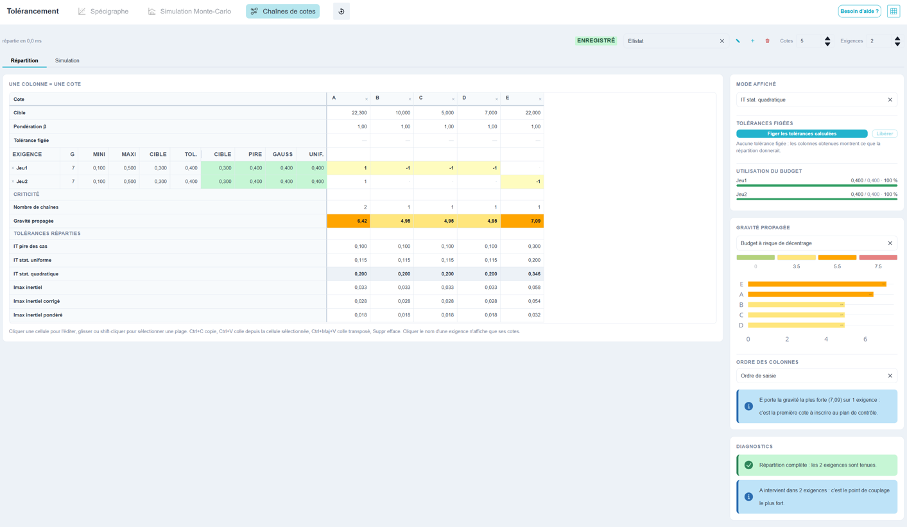
The entire analysis fits into a single table, and the rules for reading it are simple: each column represents a dimension, and you scroll down that column to learn everything about it. The left-hand block stays fixed when you scroll horizontally, and the header stays fixed when you scroll vertically—that’s what makes the screen manageable even for files with 150 specifications.
From top to bottom:
- Target: the par value;
- β weighting: the relative weight of the rating in the allocation. If β is 1.00 across the board, the budget is allocated equally; a rating that is difficult to machine is assigned a higher β to account for a larger share;
- Fixed tolerance: a tolerance specified in advance, when the dimension is non-negotiable—a component for commercial use, a part already in production;
- the requirements block: one line per requirement, and at the intersection of the row and column, the coefficient α for the dimension in that string;
- criticality: the number of chains in which the level is involved, and its propagated severity (§4.7);
- Distributed tolerances: the result, shown on six lines—one for each tolerance convention (§4.5).
The grid can be navigated using the keyboard just like a spreadsheet: click to edit a cell, drag or Shift+click to select a range, Ctrl+C and Ctrl+V to copy and paste, Ctrl+Shift+V to paste transposed, and Delete to clear. Clicking on a requirement’s name displays only its dimensions—with 150 columns, it’s impossible to spot the four non-zero cells in a row just by looking.
State the requirements
Each requirement has a name, a severity level (G), and a range. The four columns—Min, Max, Target, and Tolerance—are editable and synchronized: changing Min or Max recalculates the target and tolerance; changing the target shifts the range while maintaining its width; changing the tolerance widens or narrows the range around the Target. You can therefore enter data in whichever format is available to you—whether it’s a drawing or a set of specifications.
The following columns, separated by a line, are not to be entered: these are the calculated values—that is, the actual results of the distributed tolerances, recalculated based on four scenarios: target, worst-case, Gaussian, and uniform.
⚠️ The "Target Obtained" column serves as a data validation check, not just a result. It is equal to Σ αᵢ · targetᵢ and is compared to the declared target. If the string is correct, the cell turns green. Reversing a sign in a string of 150 values immediately turns the cell red, with the deviation displayed in a tooltip: in the reference example, reversing the E coefficient in Set2 results in a calculated target of 44.300 instead of 0.300. That saves a whole day of research.
The distribution: the tightest first
The calculation is instantaneous and restarts with every keystroke. The process consists of four steps:
- For each requirement that has not yet been addressed, we calculate the constraint it would impose on the dimensions that are still unspecified;
- We select the most restrictive requirement—the one with the smallest tolerance;
- You allocate your budget across your available positions, in proportion to the β weights;
- These tolerances become constraints for the next set of requirements, and the process starts over.
Tackling the most stringent constraint first allows the broader requirements to take whatever is left, rather than having a value imposed on them that they didn’t need to accept. In the reference example, Game1 — four dimensions with the same tolerance — takes precedence over Set2, and E, which belongs only to Set2, inherits the budget that Set1 did not use: 0.300 versus 0.100 for the other four dimensions in the worst-case scenario.
The “Freeze Calculated Tolerances” button converts the result into data: the distributed tolerances become imposed tolerances, and the resulting columns become a verification. This is the step to take when the distribution is finalized and you want to test variations around it. “Unlock” returns control to the calculation. There is no mode to select: the screen adapts to what is locked and what is not.
💡 In each column, the cell for the requirement that determined the tolerance for the measurement is highlighted. With two rows, you can guess; with fifty, it’s the most useful piece of information on the screen—it tells you who to ask for a budget if a dimension is too tight.
The Six Tolerance Conventions
The six result rows are not six different calculation methods: they are six different promises made to the supplier, and therefore six different tolerance levels for the same requirement.
| Agreement | What this implies for the supplier | In the example: A B C D / E |
| Worst-case scenario | Nothing. The requirement is met regardless of how the dimensions are centered within their tolerance. | 0,100 / 0,300 |
| Uniform Distribution | The dimensions are evenly distributed within their tolerance limits. | 0,115 / 0,200 |
| Quadratic Statistics | The scores are Gaussian and centered on their target. | 0,200 / 0,346 |
| Inertial | The deviation from the target is factored into the budget along with the dispersion: this is the maximum allowable inertia. | 0,033 / 0,058 |
| Corrected Inertial | Like the inertial method, but without ever allowing for more dispersion than in the worst-case scenario. | 0,028 / 0,054 |
| Weighted Inertial | A slider controls the trade-off between worst-case guarantee and inertia savings. | 0,018 / 0,032 |
💡 The six conventions are calculated continuously, all six of them. The displayed Mode selector does not change the calculation; it selects the highlighted line and the one that drives the propagated gravity. Comparing the lines with one another is instructive: in the reference example, switching from the worst-case scenario to the quadratic statistical model doubles the tolerance of dimensions A through D.
⚠️ On a chain with fewer than three odds, the uniform composition outperforms the worst-case scenario—on Game 2, 0.505 versus 0.400. This is not a calculation error: it is an arithmetic property of the quadratic sum, which only becomes favorable starting with three odds. The screen indicates this; otherwise, one might interpret «uniform red» as a poor compromise, when in fact the chain is simply too short for that interpretation to make sense.
The results: a single color rule
If within limits, it’s green. If exceeded, it’s red. There is no third color, no “Verdict” column, and no mode to declare. Hovering over a cell shows the remaining margin or the excess as a number, and the value is always written in the cell: the color never conveys the information on its own.
The useful reading is that of all four columns together. A green requirement in the Gaussian distribution and a red requirement in the worst-case and uniform scenarios is not met in absolute terms: it is met provided that the supplier centers its measurements. This is exactly what the agreed-upon convention states, and this is what must be written into the contract.
Propagated Severity: Which Metric to Monitor
This is the most directly actionable output from the screen. A requirement has a severity rating—7 in the example, on the scale you already use in your FMEA analyses. This severity rating is distributed among the metrics it applies to, in proportion to each metric’s share of the requirement’s budget, and a metric that applies to multiple requirements aggregates their severity ratings.
The calculation takes five criteria into account: the severity of the requirement, the weight of the rating in the chain, how tight it is relative to what is strictly necessary, the tolerance convention used, and the number of requirements involved. The result is a score for each dimension, displayed in the “Propagated Severity” row and color-coded in bands—green, yellow, orange, red—whose thresholds are editable and saved with the analysis.
The convention matters, and it is intentional. The worst-case scenario guarantees the requirement regardless of the centering; the statistical analysis assumes centered odds, and any deviation from centering is then added directly to the average of the resultant. A statistical convention is therefore a conditional promise, and a rating that depends on it carries more risk: in the example, the same rating ranges from 4.95 in the worst-case scenario to 6.42 in quadratic statistics. Conversely, inertial methods explicitly account for off-center distribution and lower the score.
The panel on the right completes the row with a Pareto chart of the most severe ratings, an option to display the columns in descending order of severity, and a concluding statement: in the example, «E has the highest severity rating (7.09): this is the first rating to be included in the control plan.» This serves as a direct link to the control plan and to the SPC control charts.
💡 The “Number of Chains” line, just above it, is read in conjunction with it. A setting that affects multiple requirements is a coupling point: loosening it relieves several chains at once, while tightening it penalizes them all. The screen specifically identifies it by name in its diagnostics.
Use of the Budget
A gauge for each requirement shows the used interval as a percentage of the available interval. At 100 %, the budget is used exactly—which is the case for both requirements in the example. Below that, the requirement does not use all of its allocated budget: there is remaining tolerance, unless its values are fixed, in which case the underutilization is a margin rather than waste. The screen makes this distinction automatically.
The "Diagnostics" section at the bottom of the column summarizes the status of the allocation: whether requirements have been met, coupling ratios, and unspent budgets. The "Simulation" tab: what the allocation doesn't show
The breakdown answers the question, «What tolerances should be specified?» It does not address the question, «What if the dimensions are not centered?» The Simulation tab generates a large number of possible assembly scenarios and examines, requirement by requirement, how many of them remain feasible.
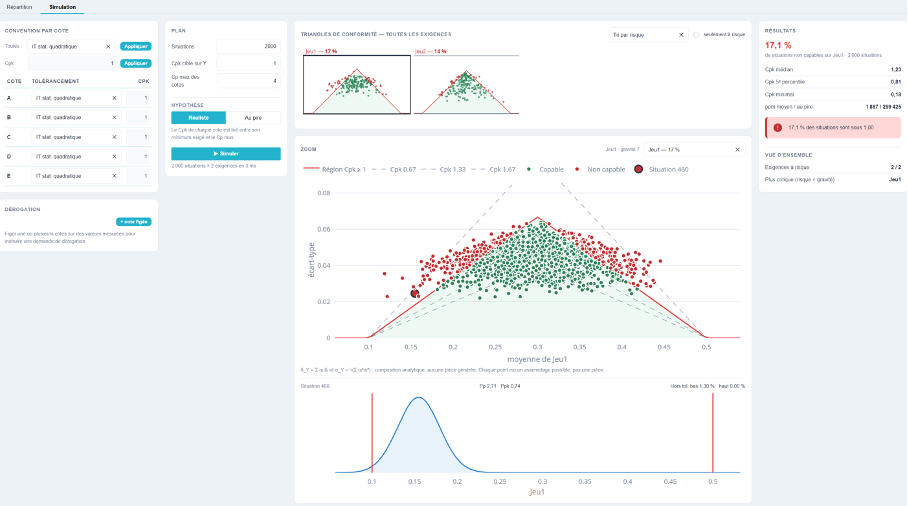
A situation is not a part; it is a state of the process. For each dimension, we calculate a deviation and a standard deviation within the range permitted by the specification, then analytically determine the mean and standard deviation of the requirement. Under the Gaussian assumption, the result is exact, and the calculation is a thousand times faster than generating results part by part: two thousand situations across fifty requirements can be processed in a few milliseconds. Each point on the graph represents a possible assembly, not a part.
Convention by Dimension. The table on the left lists, for each dimension, its tolerance convention and minimum Cpk. These are indeed attributes per dimension: two dimensions of the same assembly may come from suppliers who do not commit to the same capability. The grouped application bar at the top—a method selector, a Cpk field, and an Apply button—applies a value to all dimensions in a single action, and the two fields are independent.
Plan. The number of scenarios, the target Cpk for the Y variables—the threshold below which a scenario is deemed incapable—and the maximum Cp for the dimensions, which defines the performance level we are willing to accept from a supplier.
Hypothesis: In the worst-case scenario, each dimension is produced exactly at the minimum required Cpk—the supplier does only the bare minimum. Realistically, the Cpk for each dimension falls between the required minimum and the maximum Cp: some suppliers perform better than the contract requires. The difference between the two answers measures how much you owe to your suppliers’ goodwill.
The Exemption: Can I Assemble This Lot?
The "Derogation" block allows you to lock one or more dimensions at their measured values—with the observed skew and standard deviation—while the others continue to vary within their ranges. The simulation then indicates the actual risk associated with the assembly using that particular batch.
💡 This is the decision we make every day on the factory floor, usually based on judgment: a batch is out of tolerance on one dimension—should we reject it? The screen displays a number, and the answer is often that the batch can be assembled because the other dimensions in the production line have some leeway.
Reading Compliance Triangles
Each requirement has its own triangle: the x-axis represents the mean of the resultant, and the y-axis represents its standard deviation. The flat region is where the target Cpk is maintained; its triangular shape conveys the essential point: the further off-center you are, the less variation you can tolerate. A green dot indicates an acceptable situation; a red dot indicates an unacceptable one.
All requirements are displayed at once as thumbnails, with the percentage of non-capable situations shown at the top. Sorting by descending risk puts them in the order in which they should be reviewed; the “only at risk” checkbox hides those that do not pose a problem. Clicking a thumbnail enlarges it, showing the iso-Cpk contours 0.67 · 1 · 1.33 · 1.67; clicking a point provides details on the corresponding situation and displays, below the triangle, the distribution of the requirement in that situation along with its Pp, Ppk, and the rates of exceedance on both sides.
The Results panel displays, for the requirement shown, the percentage of non-conforming cases, the median Cpk, the 5th percentile Cpk, the lowest Cpk observed, and the average ppm compared to the worst-case ppm. The Overview concludes with the number of at-risk requirements and identifies the most critical one by cross-referencing risk and severity.
⚠️ The difference between the average ppm and the worst-case ppm is the key information on this screen. In the example, the average is 1,867 ppm, but the worst-case scenario is 299,425 ppm: the distribution is acceptable on average but catastrophic in a specific case—one that will inevitably occur. A comfortable median Cpk is no guarantee; it’s the 5th percentile that you need to look at.
💡 Triangles do not depend solely on tolerances but on the conventions specified by dimensions. Running the simulation again by using the worst-case dimensions from the quadratic statistical analysis—or by lowering a supplier’s required Cpk—immediately quantifies the cost or benefit of the negotiation.
Recording the Analysis
A dimensional chain analysis is a deliverable that remains valid for several years and is updated with each product iteration. It is therefore saved in its entirety: dimensions, targets, weightings, fixed tolerances, requirements and their intervals, coefficients, severity bands, conventions and Cpk per dimension, exceptions, and simulation settings. The name of the analysis and its status (saved or modified) are displayed in the title bar, and the dimension and requirement counters allow you to resize the grid.
💡 Reopening an analysis yields exactly the same results, including the simulation cloud: the draw is reproducible. This is what allows us to justify, during an audit two years later, why a particular tolerance was chosen.